
The 60-Minute Makeover: Mastering AI Restaurant Design for Viral Interiors

Discover how AI powered restaurant design enables rapid 60 minute makeovers, creating viral interiors through smart layouts, visuals, and data driven creativity.
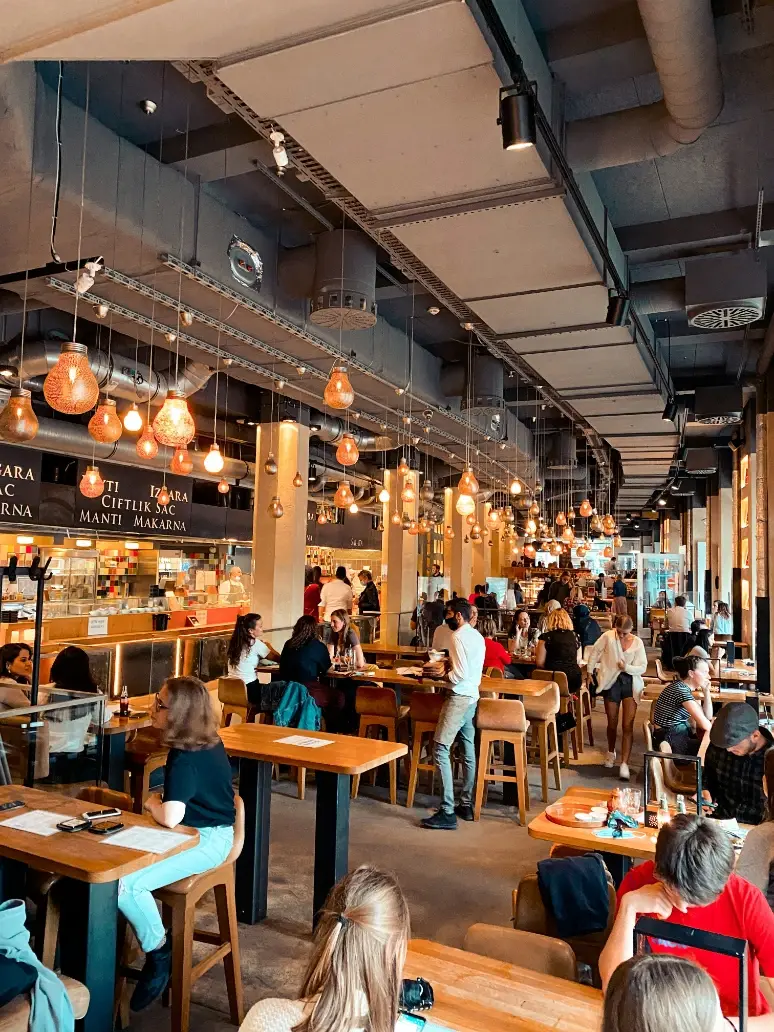
Key Takeaways:
Speed to Market: Learn how to transform a raw concept into a visual strategy in under an hour, saving weeks of back-and-forth with agencies.
The "Vibe" Economy: Discover why "Instagrammability" is now a measurable design metric and how to optimize for it digitally.
Cost Control: Use AI to visualize expensive materials (marble, brass, velvet) before purchasing to ensure they justify the ROI.
Tool Mastery: A practical guide on using an AI restaurant design generator to bridge the gap between your culinary vision and the physical space.
Design Your Dream Restaurant: See how AI tools empower you to quickly visualize and design your dream restaurant, making the process fast, easy, and inspiring.
Introduction: Speed is the New Luxury
In the restaurant industry, time is the most expensive commodity. Every day you spend waiting for architectural renders or debating paint swatches is a day you are paying rent on a venue that isn't serving customers. Traditionally, the design phase is a bottleneck. It involves mood boards, sketches, expensive consultations, and the agonizing wait for "Version 1.0" from a design firm.
But the rules of the game have changed. The intersection of hospitality and technology has given birth to a new workflow: the "Flash Design." With AI restaurant design tools, you can start from scratch-building your restaurant's look and layout without being limited to templates-giving you full flexibility and customization from the very beginning.
Imagine walking into a bare concrete shell at 9:00 AM, taking a photo, and by 10:00 AM having a fully visualized, photorealistic concept of a bustling, trendy bistro. This isn't science fiction; it is the new standard enabled by AI restaurant design.
For the readers of Sip The Style-who understand that a restaurant feeds the eyes as much as the stomach-this technology is the ultimate unlock. It allows you to curate an atmosphere, test risky ideas, and validate your "vibe" before you sign a lease. In this comprehensive guide, we will walk you through a 60-minute sprint to design a viral-worthy restaurant interior using artificial intelligence.
Minute 0-10: The "Vibe Check" and Concept Definition
Before you open any app or write a single prompt, you need to define the soul of the space. AI is a powerful engine, but it needs a destination. Having a complete vision or concept before starting the AI design process ensures that all aspects are considered, resulting in a cohesive and polished outcome. If you ask for a "nice restaurant," you will get a generic hotel lobby. If you ask for specific emotions, you will get art.
The Psychology of "Instagrammability"
In 2026, if guests aren't taking photos of your interior, you are losing free marketing. But what makes a space viral? It is rarely just "luxury." It is about lighting, contrast, and novelty.
The "Hook": Every viral restaurant has one signature element. A neon sign, a flower wall, a velvet ceiling, or a unique floor tile pattern. Incorporating distinctive design elements-such as symbols, icons, or textures-can further enhance the space's visual appeal and make it more shareable on social media.
The Lighting: Phones hate dark, flat lighting. They love diffuse, warm glows or dramatic shadows.
Defining Your Prompt Strategy
Spend the first ten minutes answering these four questions. Your answers will become the "seed" for your AI generation.
Cuisine & Culture: Is it Peruvian Nikkei? French Bistro? Cyberpunk Ramen?
Target Emotion: Do you want guests to feel energized and loud (Hard surfaces, bright lights)? Or intimate and secretive (Soft textiles, dim lights)?
The "Hero" Material: Pick one dominant texture. Brass? Terrazzo? Reclaimed wood?
Presentation: What kind of presentation do you want for your space? (e.g., formal, casual, vibrant, minimalist) - This helps ensure the AI output matches your desired visual and organizational style, making the final design visually appealing and well-organized.
Example Strategy:"We are building a modern speakeasy. The emotion is 'mysterious luxury'. The hero material is green velvet and dark walnut wood."
Minute 10-30: The Generation Phase
Now that you have a vision, it is time to use an AI restaurant design generator. This is the "heavy lifting" phase where we turn words into pixels.
When generating your restaurant design, consider which format best suits your needs-whether that's PNG or PDF for printing, SVG for further editing, or HTML for sharing online. Selecting the appropriate format ensures your generated designs are ready for their intended use.
Choosing the Right Tool
There are many tools on the market, ranging from simple image filters to complex architectural software.
For Pure Inspiration: Tools like Midjourney are great for abstract ideas but struggle with keeping the room's actual shape.
For Realism & Execution: Platforms like Paintit.ai are designed specifically for this. They allow you to upload a photo of your actual space and "dress" it. This is critical because you don't just want a pretty picture; you want to see your walls and your windows transformed. These tools also let you display your generated designs on in-store digital boards or within your physical store, enhancing the customer experience and making it easier to share your vision both online and in person.
The Prompting Formula for Hospitality
To get professional results, use this prompting formula: [Space Type] + [Style] + [Key Elements] + [Lighting/Mood] + [Color Palette]
Prompt Example: "Upscale bar and lounge, Art Deco style with a modern twist. Curved velvet booths, brass bar counter, geometric floor tiles. Moody amber lighting, cinematic atmosphere. Deep emerald green and gold color palette."
Iterating for Perfection
You will rarely get the perfect image on the first try. This 20-minute block is for "rapid prototyping."
Generate Batch 1: Run your prompt. You might find the "emerald green" looks too dark.
Tweak: Change the prompt to "Sage green, lighter atmosphere."
Refine: Notice the floor looks boring? Add "Terrazzo flooring with large aggregate."
This is where the magic happens. In traditional design, changing the floor from wood to tile takes a designer hours of rendering time. With AI interior design for restaurant workflows, it takes seconds. You are essentially A/B testing your interior before buying a single tile.
Minute 30-50: Refining the Details (Texture & Lighting)
You have a layout and a general look. Now, you need to make it feel expensive. The difference between a cafeteria and a fine-dining establishment is often just texture and lighting temperature.
Mastering Light Temperature
Lighting is 50% of the design. When using AI, be specific about the time of day and type of light.
Lunch Spots: Use prompts like "Natural daylight, large windows, airy atmosphere, 4000K lighting." This makes food look fresh and the space feel clean.
Dinner/Date Spots: Use prompts like "Golden hour, candlelight, dim pendant lights, 2700K warm glow, intimate shadows."
Texture Swapping
Flat walls are boring. Use this time to experiment with wall treatments.
Wainscoting: Adds instant class to a bistro.
Exposed Brick: Adds grit to an industrial bar.
Venetian Plaster: Adds depth and luxury to a Mediterranean spot.
Tools like Paintit.ai excel here because they understand materiality. When you ask for a "leather sofa," the AI renders the sheen and the creases of the leather, helping you visualize if it clashes with the "glossy marble table." This level of detail is crucial for avoiding costly purchasing mistakes.
Minute 50-60: The "Viral" Audit & ROI Check
You have 10 minutes left. You have a folder full of stunning designs. Now you need to think like a business owner.
The "Bathroom Selfie" Test
It sounds trivial, but the bathroom is often the most photographed room in a modern restaurant.
The Check: Run a quick generation for the restrooms using your design theme. Does it look cool? Is the mirror lighting flattering? If not, adjust the prompt.
The Corner Check: Identify the "dead zones" in your layout (dark corners, tables near the kitchen). Use AI to test placing a large plant, a neon sign, or a bookshelf there. Transform the worst seat in the house into the most cozy one.
The Feasibility Check
Look at your favorite AI render. Is that chair available in the real world? Is that chandelier custom-made? One of the benefits of using product-aware AI tools is that they often suggest furniture that resembles real-world items. This helps you move from "fantasy" to "shopping list."
Best Practices for AI Restaurant Design
A professional menu is more than just a list of dishes-it's a key design element that shapes your customers' first impressions and guides their dining experience. With the rise of AI restaurant design tools, creating an ai generated menu that's both visually stunning and highly functional has never been easier. To fully customize your restaurant menu and make it stand out, follow these best practices:
1. Start with a Clear Concept:Before you generate your menu, define your restaurant's theme, cuisine, and target audience. Use the same prompt-driven approach as you would for your interiors-input your style, cuisine type, and any unique selling points into the AI tool. This ensures your menu reflects the vibe and concept of your space, whether it's a modern café, upscale bar, or cozy bistro.
2. Leverage Menu Templates, Then Customize:AI menu generators often provide a variety of menu templates tailored to different restaurant styles. Choose a template that matches your brand, then fully customize fonts, colors, and layouts to align with your interior design and logo. This creates a seamless visual flow from your dining room to your menu, reinforcing your brand identity.
3. Focus on Readability and Structure:A professional menu should be easy to navigate. Use clear headings for appetizers, mains, desserts, and drinks. Incorporate icons or dietary labels (like vegan, gluten free, or spicy) to help guests make quick, informed choices. AI tools can suggest optimal layouts and even generate engaging dish descriptions that highlight key ingredients and flavors.
4. Integrate High-Quality Images and Descriptions:Modern AI restaurant menu tools allow you to upload or generate images of your dishes, making your offerings more enticing. Pair these visuals with concise, mouth-watering descriptions. This not only enhances the menu's appeal but also sets clear expectations for your customers.
5. Keep Menus Up to Date and Adaptable:One of the biggest advantages of an ai generated menu is the ability to quickly update items, prices, or dietary information. Use your AI tool to generate new seasonal menus, add limited-time offers, or adjust for supply changes-no design skills needed. Save, download, and print your updated menus in various formats (PDF, digital, or print-ready) directly from the platform.
6. Test and Iterate:Just as you would A/B test your restaurant interiors, use AI to generate multiple menu versions. Share them with your team or a focus group to gather feedback on layout, readability, and overall appeal. This iterative process ensures your final menu is both beautiful and effective.
By following these best practices, you can harness the power of AI to create unique, professional menus that not only complement your restaurant interiors but also enhance the overall dining experience. With the right tool, you can transform your menu from a simple list into a key part of your restaurant's story-one that's always up to date, on brand, and ready to impress.
Deep Dive: How to Design Restaurant AI Strategies for Different Styles
To give you more context, let's look at how AI handles three currently trending restaurant styles. With AI-generated designs and menus, you can easily share your concepts online-even if you don't have a dedicated website-by using direct links or posting on social media platforms.
1. The "Biophilic" Oasis
The Trend: Bringing the outdoors in. Massive plant walls, sustainable materials, raw wood.
The AI Challenge: AI can sometimes make plants look like a jungle that eats the tables.
The Fix: Be specific. Prompt for "Potted olive trees, hanging pothos plants, controlled greenery." Focus on natural light.
2. The "Cyberpunk" Izakaya
The Trend: Neon lights, concrete, exposed pipes, futuristic Tokyo vibes.
The AI Challenge: Balancing the neon so it doesn't look like a nightclub.
The Fix: Prompt for "Cinematic lighting, neon accents, slate grey walls." Use AI to check if the red neon light makes the food look unappetizing (a common mistake).
3. The "Grandma Chic" (Cottagecore) Bakery
The Trend: Floral wallpapers, mismatched vintage chairs, pastel colors.
The AI Challenge: Avoiding a cluttered look.
The Fix: Use prompts like "Curated vintage, pastel palette, airy, organized clutter."
The Financial Argument: Why Start with AI?
Why are top hospitality groups switching to this workflow? It comes down to ROI (Return on Investment). AI restaurant design tools enable seamless collaboration among chefs, managers, and marketing teams, allowing them to efficiently create, review, and finalize menus and interior designs. Additionally, using AI to generate customized menus for catering services and special events delivers significant cost savings and convenience for hospitality businesses.
AI Restaurant Design Free vs. Paid Professional Tools
You will see many searches for AI restaurant design free tools. These are excellent for the "napkin sketch" phase-just having fun and exploring ideas without cost. However, when you are ready to spend hundreds of thousands of dollars on a renovation, upgrading to a professional tier is a safety net.
Professional AI tools offer:
Higher Resolution: You need 4K images to print large boards for your contractors.
Privacy: You don't want your competitors seeing your unique concept on a public discord server.
Consistency: The ability to keep the same room structure while changing only the furniture.
Saving on Professional Fees
An interior designer might charge $5,000 - $10,000 just for initial concepts. By using how to design restaurant AI workflows, you can do this initial phase yourself. You can then hand the designer a polished visual brief and say, "I want this, but compliant with building codes." This reduces their billable hours and ensures you get exactly what you wanted.
Conclusion: Your Vision, Accelerated
The hospitality industry is about theatre. You are setting a stage for people to fall in love, celebrate deals, and make memories. For a long time, the ability to set this stage was limited by budget and technical skill.
Today, the barrier to entry is gone. In 60 minutes, you can travel from a vague idea in your head to a photorealistic future on your screen. You can test the boldest ideas-purple ceilings, gold floors, indoor waterfalls-without risking a cent. With AI restaurant design, you can also quickly generate and update menus for different meal types-breakfast, lunch, and dinner-adapting to changing customer needs with ease.
At Paintit.ai, we believe that the best restaurants are the ones that have a clear, uncompromising vision. AI is simply the tool that helps you clear the fog and see that vision in high definition.
So, take that lunch break. Grab your phone or laptop. In the next hour, you might just design the next hotspot that everyone will be talking about.


Comments